01
- Headphone query
- Product matches
- Your shortlist
Shortlist products
Search for a category and keep each matching product ID with the original query.
Explore this workflow Klarna API
Find a product, inspect its retailer offers and keep observed prices tied to the right item and market.
150 free credits to start·No card required
/klarna/searchmonocrawl / klarna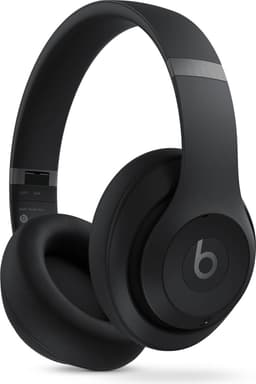
Beats Studio Pro in Klarna search
Recorded excerpt. Values may change; missing fields stay null.
The data
Klarna search returns product matches with titles, categories and displayed prices. That first amount is useful for discovery, but it is not a checkout quote or every seller’s offer. Open a selected product and its offers when the merchant, currency and condition matter. The Beats Studio Pro result shown here came from a headphone query; its retailer count and rating were recorded with the same search response. Price history and comparison have separate operations, so a current-looking search card should not be read as a historical trend. Monocrawl returns these public shopping records as JSON for product research that keeps the source item attached.
Find matching products with source IDs, categories and displayed prices.
query → productsOpen a selected item before comparing variants or sellers.
product ID → detailsKeep merchant and observed price together for each returned offer.
product ID → offersInspect available historical observations separately from today’s offer.
product ID → observationsRead the returned feedback behind a product rating.
product ID → reviewsRequest → response
Inspect selected fields from a recorded Klarna response for Beats Studio Pro in Klarna search. Choose a language and use your own key to request current data.
Replace the example inputs with your own target. Send your key in the x-api-key header.
Read the returned record from data. Check credits_used for the call’s confirmed credit usage.
GET /v1/klarna/searchcurl "https://www.monocrawl.com/v1/klarna/search?query=headphone&limit=10" \
-H "x-api-key: mn_your_key_here"{
"query": "headphone",
"items": [
{
"title": "Beats Studio Pro - Black",
"price": 169.95,
"currency": "USD",
"rating": {
"value": 4.5,
"votes": 112,
"max": 5
},
"retailers_count": 14
}
]
}Recorded 21 Sep 2026 for Beats Studio Pro in Klarna search. Selected fields only; this is a historical snapshot.
What you can build
Use Klarna data in the products and workflows you’re already building.
Search for a category and keep each matching product ID with the original query.
Explore this workflowOpen a product and its available offers before comparing merchant and observed price.
Explore this workflowRead the available price history separately from a current-looking search result.
Explore this workflowKlarna API pricing
Start with 150 free credits. Choose a paid plan when you need a monthly allowance.
$0/ month
150 free credits to start
Try the endpoints your application needs, with your own API key.
Sign inEmail verification required. Free usage limits apply. See limits
$29/ month
10,000 credits every month
More monthly credits for your Klarna integration and other supported platforms.
Explore the Starter planUSD, before applicable tax. See pricing for subscription terms.
Explore by data type
18 currently available operations, grouped by the data you need. Open an endpoint for parameters, response details and pricing.
category3 creditscategories1 creditcategories-children1 creditcategory-filters1 creditcategory-keywords1 creditcategory-guide1 creditstores1 creditstore-products3 creditsstore-filters1 creditListed credit prices are per request. Metered or variable-cost operations can settle differently; check the endpoint reference when budgeting.
No. It is the displayed amount in one recorded search response. Open offers and retain the seller, region, currency and collection time before comparing prices.
No. It is a source-reported count for that product at observation time. It can differ from the offers returned to a particular request.
The catalogue shows 18 currently available operations with their individual prices. Open an endpoint for its accepted inputs, returned fields and limitations.
Start with 150 free credits. Paid subscriptions start at $29 per month for 10,000 credits, before applicable tax. Each operation has its own price. Check the endpoint reference for variable charges. Compare plans
Use your Monocrawl API key in the x-api-key header. The endpoint reference lists any additional inputs needed for the operation. Authentication guide
Limits depend on your Monocrawl plan. The Free account ceiling is 600 requests per minute and 50 simultaneous requests. Endpoint capacity and Free daily protections also apply; these ceilings do not guarantee source throughput. Read the limits guide
Displayed search prices, instalment figures and retailer counts are dated source observations, not checkout quotes. Offers and history may cover different merchants, markets or time windows; keep that context with every amount.
Monocrawl is an independent service. Third-party names identify data sources and do not imply a partnership or endorsement.
Your next build starts here
Start with 150 free credits. No card required.
Try the Klarna API Google Shopping
 Amazon
 Walmart